Extract Text & Tables from Images and PDFs
Free online AI OCR tool to turn screenshots, receipts, and scanned documents into editable Excel sheets, Word files, or clean text.
Start in seconds, no downloads or setup required
Files are processed live and never saved
100+ languages accurately supported


Convert Table Images & Screenshots into Editable Excel
Automatically extracts table grids, merged cells, and handwritten rows into standard .xlsx files, eliminating tedious manual data entry.
Extract Tables with Embedded Cell Images
Automatically crops and embeds photos directly into corresponding Excel cells alongside text, solving the pain point of lost images in standard tools.
Daily Expense Logs & Handwritten Tables
Directly recognizes paper expense logs and hand-drawn grids, extracting handwritten figures to eliminate tedious manual retyping.
Software Dashboards & System Reports
Extracts dense data grids from web listings, keeping technical model numbers, symbols, and pricing cleanly formatted for instant calculation.
Multi-row & Multi-column Header Spans
Accurately resolves complex multi-row and multi-column mergers and nested header hierarchies, preventing column misalignments.
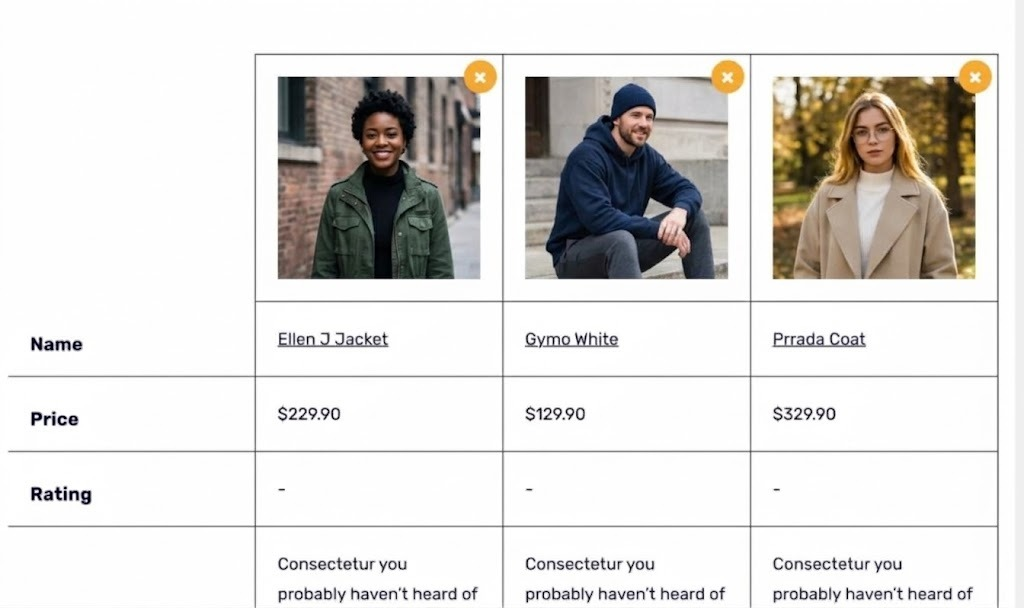
| A | B | C | D | |
|---|---|---|---|---|
| 1 |  |  |  | |
| 2 | Name | Ellen J Jacket | Gymo White | Prrada Coat |
| 3 | Price | $229.90 | $129.90 | $329.90 |
| 4 | Rating | - | - | - |
| 5 | Description | Consectetur you probably haven’t heard of | Consectetur you probably haven’t heard of | Consectetur you probably haven’t heard of |
Choose the right tool for you
Start from the task you have, then open the matching tool.
Convert images to Excel spreadsheets
Recognize table borders and cells to extract structured data into clean .xlsx files.
Turn scans into editable documents
Convert image or PDF scans into Word documents when you need editable text.
Make scanned PDFs searchable
Add a searchable text layer so scanned PDF pages can be searched, selected, and copied.
Extract text from screenshots or photos
Copy text from app screenshots, document photos, receipts, posters, and other images.
Processed So Far
Pricing
Choose the plan that fits your workflow. Cancel anytime.
- Batch extraction up to 25 images
- Max file size 15 MB
- 2x multi-image conversion speed
- Dedicated AI optimization channel
- Batch extraction up to 50 images
- Max file size 25 MB
- 3x multi-image conversion speed
- Dedicated AI optimization channel
- Batch extraction up to 100 images
- Max file size 30 MB
- 5x multi-image conversion speed
- Dedicated AI optimization channel
Why Choose Us
Free
Core OCR features free forever, no signup needed
Instant Access
No download or install needed, works right in your browser
Privacy First
All processing runs locally in your browser
100+ Languages
Supports 100+ languages including CJK scripts
Batch Processing
Process multiple images or PDF pages without repeating the same steps
Flexible Output
Copy text, export Word documents, or create searchable PDFs
Your Privacy, Our Priority
Your File
Support table screenshots, receipts, invoices, or scanned PDFs
Secure Processing
Local-first execution and stateless AI processing with zero trace
Instant Export
Instantly generate standard Excel spreadsheets, Word documents, or clean text